Productivity Dashboard
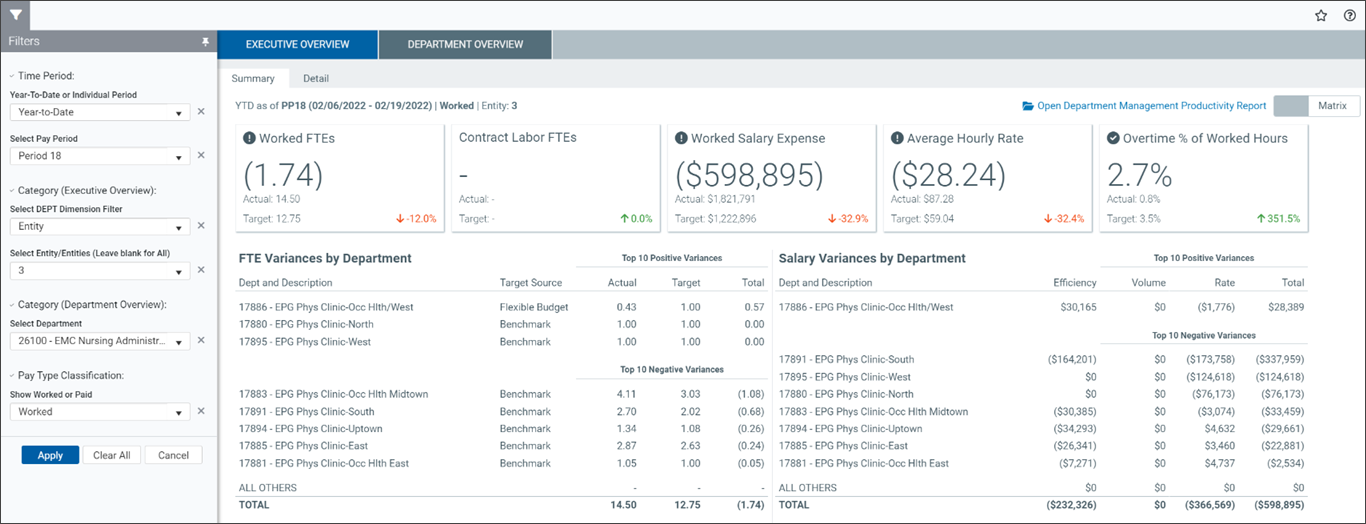
This dashboard provides a visual overview of executive and department information from the Department Management Productivity report. The dashboard is comprised of two tabs: Executive Overview Displays productivity data for upper management. and Department Overview Displays productivity data for a selected department.. The default view is Executive Overview.
Open the dashboard
Non-admin users with Productivity User or Report Subsystem Permissions roles:
-
Go to Main > Open App Menus > Productivity Management > Bi-Weekly Productivity Reports > Department Management Productivity Dashboard
-
Select the refresh variables in the Filters panel.
Admin users with the Productivity Admin role:
-
Go to Admin > Admin Task Panes > Productivity Admin > Bi-Weekly Productivity Reports > Department Management Productivity Dashboard
-
Select the refresh variables in the Filters panel.
The Department Management Productivity Dashboard includes:
